
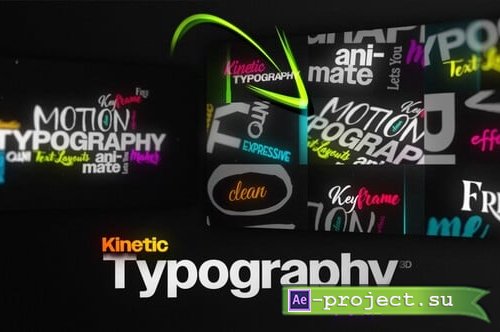
Videohive - Kinetic Typography Maker 3D | Procedural Text Animation Engine for Custom Layouts No-Keyframes - 61385043
After Effects Version CC | Resizable | No plugins required | 40.8 MB
After Effects Version CC | Resizable | No plugins required | 40.8 MB
https://videohive.net/item/kinetic-typography-maker-3d-procedural-text-animation-engine-for-custom-layouts-nokeyframes/61385043
Promo preview is included.
ffx Preset is included for easy reuse and application across multiple projects.
Dynamic Animation Without Keyframes!
Just Type Your Text and Design Your Layout!
No plugins – No hidden Layers.
Unique feature that has never been done before!
Create Dynamic Kinetic Typography No Keyframes Needed
Effortless fully automated animations that adapt instantly to your text layers.
Design custom typography layouts and watch them come alive with expressive motion.
Yes it’s really that simple!
Just add your text layers and let the Kinetic Typography Engine do the rest.
Bring your text layouts to life with this smart animation typography system.
Effortless Timing Control
3 Modes For Timing
Automatic
Just have your layers stacked and the animation will time based on the text length
Marker
Add markers to the master layer and the animation will trigger
InPoint
Adjust each layer’s In Point – Kinetic Typography Maker automatically syncs the animation to match
Fully Adaptive Non-Destructive Design
Move, rearrange or redesign your layout freely.
The animation won’t break – it evolves with you, generating a fresh procedural motion every time.
Built-In Smart Animator for Extra Punch
Add bold, expressive motion with advanced controls.
Tweak each text layer’s animation to match your creative style.
Animate by letters, words, syllables, natural reading flow, or random chunks.
Gain full control with custom easing and overshoot mode for any transform property.
Truly Responsive by Design
Works with any resolution, font, or layout.
Animations adapt to size, spacing, and text changes automatically.
Creative Freedom Without the Hassle
Focus on layout and design – let smart animation do the rest, instantly and effortlessly.
What used to take hours of keyframing now happens automatically – like magic.
Works in 3D
Easily adjust perspective, depth, camera blur, and organic target wiggle to create natural, realistic movements
Perfect Sync for Any Creative Use
Ideal for dynamic lyric videos, rhythmic captions, bold titles, quote reels, animated text hooks, social promos, and more.
Whether you’re storytelling or beat-matching, every animation moves with precision.
Ready-Made Kinetic Typography Scenes Included
Cover any use case with a rich collection of fully animated customizable scenes ready to drop in and go.
Every control is consolidated into a single FX Panel!
Global Camera Options
Edit Text Mode
Toggles a full staging/layout view so you can position and adjust typography freely before running the animation.
Animation Speed
Adjusts the overall speed of the camera animations.
Text Interaction
Controls how the camera system affects text visibility and focus behavior:
Animated Text: Enables per-text animation using custom options.
Fade Text: Fades text that is no longer in focus.
Fade All Out At End: Automatically animates everything out once the sequence is complete.
Transform
Camera transform controls for shaping the 3D feel:
Perspective: Adds custom camera perspective.
Zoom: Fine-adjusts the zoom level.
Focus
Focus and visibility controls for responsiveness and depth:
Fit Text To View: Fits the active text into view for true responsiveness.
Camera Blur: Adds camera blur amount.
Wiggle
Organic 3D abstract movement controls:
Wiggle Style: None / Smooth / Medium / Hard
3D Perspective Follow: Global / Layers (automatically adjusts perspective dynamically)
Kinetic Text Animator
Text Options (Each text has a full animator for custom adjustments)
Speed Control
Adjusts the overall speed of the animation (-100% to 100%).
Overshoot Mode
Adds a smooth, controlled overshoot to movement (position/scale/rotation) for extra punch and a more “alive” motion style.
Based On Modes
Choose how the animation is staggered across the text:
Letters: Animates per character
Words: Animates per word
Syllables: Animates by syllable groups (more natural speech rhythm)
Natural Reader: Animates using linguistic reading breaks (phrases/pauses instead of strict words)
Random Chunks: Animates random grouped sections of the text for a scattered, energetic reveal
Transform Controls
Animate using standard transform offsets:
Position: Sets the starting offset for the animation (where characters/words begin before settling)
Rotation / Scale: Sets the starting rotation and scale offsets
Random: Randomizes the animation order/indexing for less predictable motion
Скачать | Download:
