


DaVinci Resolve is the world’s only solution that combines editing, color correction, visual effects, motion graphics, and audio post-production in a single software environment. Its modern, stylish interface is simple and intuitive enough for both newcomers and experienced users. DaVinci Resolve streamlines the creative process, eliminating the need to master multiple applications or switch between different systems—all while allowing you to work with high-quality original footage. In essence, DaVinci Resolve encompasses everything you would find in a professional post-production studio. Now, you have access to the very same DaVinci Resolve tools used in Hollywood!
Software version: 21.1.2 Build 10
Official website: Blackmagic Design Pty. Ltd.
Interface language: Russian, English, others
Activation: Not required (the installer is already pre-activated)
System Requirements:
(Minimum system requirements)
Windows 10 Creators Update (x64)
16 GB of system memory or 32 GB when using Fusion.
For monitoring, Blackmagic Design Desktop Video 12.9 or later.
Integrated GPU or discrete GPU with at least 4 GB of VRAM.
GPU which supports OpenCL 1.2 or CUDA 12.8.
AMD/Intel official drivers from your GPU manufacturer.
NVIDIA Studio driver 570.65 or newer.
The following features have been added or updated:
The "Select Nearest Edit Point" function establishes a priority for selected edit points.
Selecting edit points using the "Lasso" tool now automatically triggers dynamic trimming.
Selecting edit points to create gaps now activates the Trim Editor.
A timeline view option to display an indicator for the current clip.
An option to display audio level meters in the Edit page mixer.
A project setting to disable DNG lens correction.
OGraf clips now use action duration to determine the placement of stop actions.
OGraf playback on the Edit and Fusion pages is now up to 4 times faster.
Support for template controls for single and multiple selections in OGraf.
Adaptive OGraf templates now adjust to the timeline aspect ratio.
Support for OGraf and Lottie graphics on Linux.
IntelliSearch analysis on M6 chips (macOS) is now up to 14 times faster.
Improved performance for AI-based tools on Intel platforms.
Optimized disk space usage for Magic Mask caches.
Improved sensitivity for the global trackball ring on HDR color control panels.
The "Fast Noise" option now follows the effect tracker.
Numerous enhancements to the scripting API.
Resolved an issue causing double-compression of anamorphic video output in Fusion.
Fixed an issue with "Follower" animations when using expressions.
Resolved overlay issues encountered when using SDI and remote monitoring.
Fixed an issue with "gate weave" controls in the Film Look Creator.
Resolved issues regarding HDR Vivid metadata in imported CPL timelines. Fixed an issue with searching in a Smart Bin.
Fixed issues related to disk space usage and performance of the Speech Generator on macOS 27.
Fixed issues with Music Remixer on macOS 27.
Fixed an issue where an empty folder would appear in the user directory when loading DRP files.
Fixed an issue with selecting multiple titles and subtitles.
Resolved issues with In and Out ranges on the timeline in collaborative projects.
Resolved rendering failures occurring with In and Out ranges that include Magic Mask clips.
Fixed an issue where the "Quick Export" feature failed to apply selected color corrections to a trimmed segment.
Fixed an issue with geometry thumbnails in the Media Pool.
Fixed an issue where the "Last 5 Minutes" mode would insert entire clips.
Fixed an issue where the loudness meter would not reset after scrubbing on the Edit page.
General performance and stability improvements.
Additional information:
DaVinci Resolve features new tools for processing HDR imagery with a wide color gamut, as well as 3D immersive audio. Colorists gain access to state-of-the-art HDR grading techniques and AI-powered masking methods. Streamlined clip selection workflows—using a mouse and keyboard—combined with the powerful Fairlight Audio Core platform, provide support for up to 2,000 tracks. The software includes automatically populated bins based on metadata for faster organization and retrieval of assets, improved waveform displays for audio editing, enhanced cropping and effect preview functions, and support for proxy files. Furthermore, VFX, titles, and transitions created in Fusion can be utilized within the Edit and Cut pages.
Выбор русского языка для интерфейса программы осуществляется при первом старте программы:
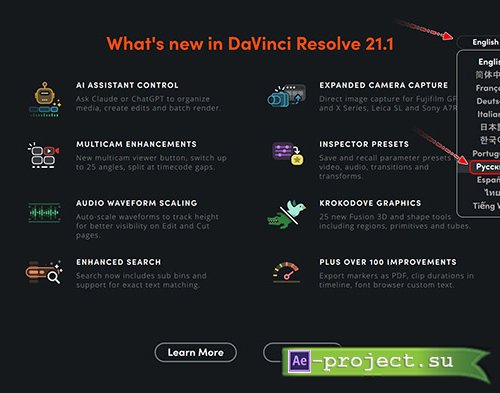
Или по пути в программе: DaVinci Resolve\Preferences\User\Language\(). В этом случае изменение языка интерфейса программы произойдёт после рестарта программы.
Скачать | Download:
